Assigned ttblaze
Timeline interaction failure. (Interacting with my timeline produces an error that blocks editing the timeline)
Timeline interaction failure. (Interacting with my timeline produces an error that blocks editing the timeline)
Open- Feature
- Timelines
- Reported by
- Eldrin of Avaloth
- Opened
- Assigned to
- ttblaze
- Last activity
Waiting for ResponseCannot Reproduce
Description
When I open my timeline via the sidebar, I am taken to the classic timeline screen showing my work.
I can still scroll and read the timeline, but as soon as I click on anything - an entry, era, title - the timeline crashes and produces an error screen.
This has been happening for at least a few weeks. I have been on different machines - laptop, computer - in various locations with different Ethernet connections and Wi-Fi connections.
On the error screen was the phrase: "7e3f6c77f71845fa8add83dfb92e8c68" shown to me to send here in order to help with the investigation...
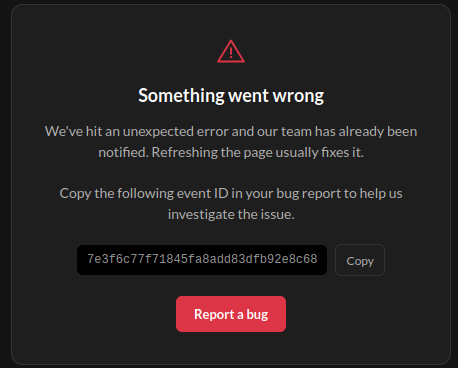
Picture of the main error. Aside from that, the screen is plain black (see the very edges of the image and image that across the entire screen)
I have refreshed the page and still get the error.
Steps to Reproduce
Below are the steps on how I have found the bug during editing the timeline.
Open sidebar.
Select timeline.
Open a timeline from the menu.
See the timeline with historical entries.
Click on an entry or try to edit anything in the timeline.
Click on "edit description" below the title.
Doing anything (for me) produced the above crash.
History
Comments and updates to this report
Added tag
Waiting for Response
Added tag
Cannot Reproduce
Find your way!
Resources
WHO WE ARE
LEGAL
Listen to our Podcast




by 3 Armored Kittens · Prodromos v.1.1 - World Anvil 0.9.15.050 © 2017-2025 [en] | Anvil Time: 11:36, Oct 15 2026